Amazon EventBridge
Events can be sent to Amazon EventBridge using the eventBridge sink type.
Like all Sinks, EventBridge sinks can be created in the Stream Portal…
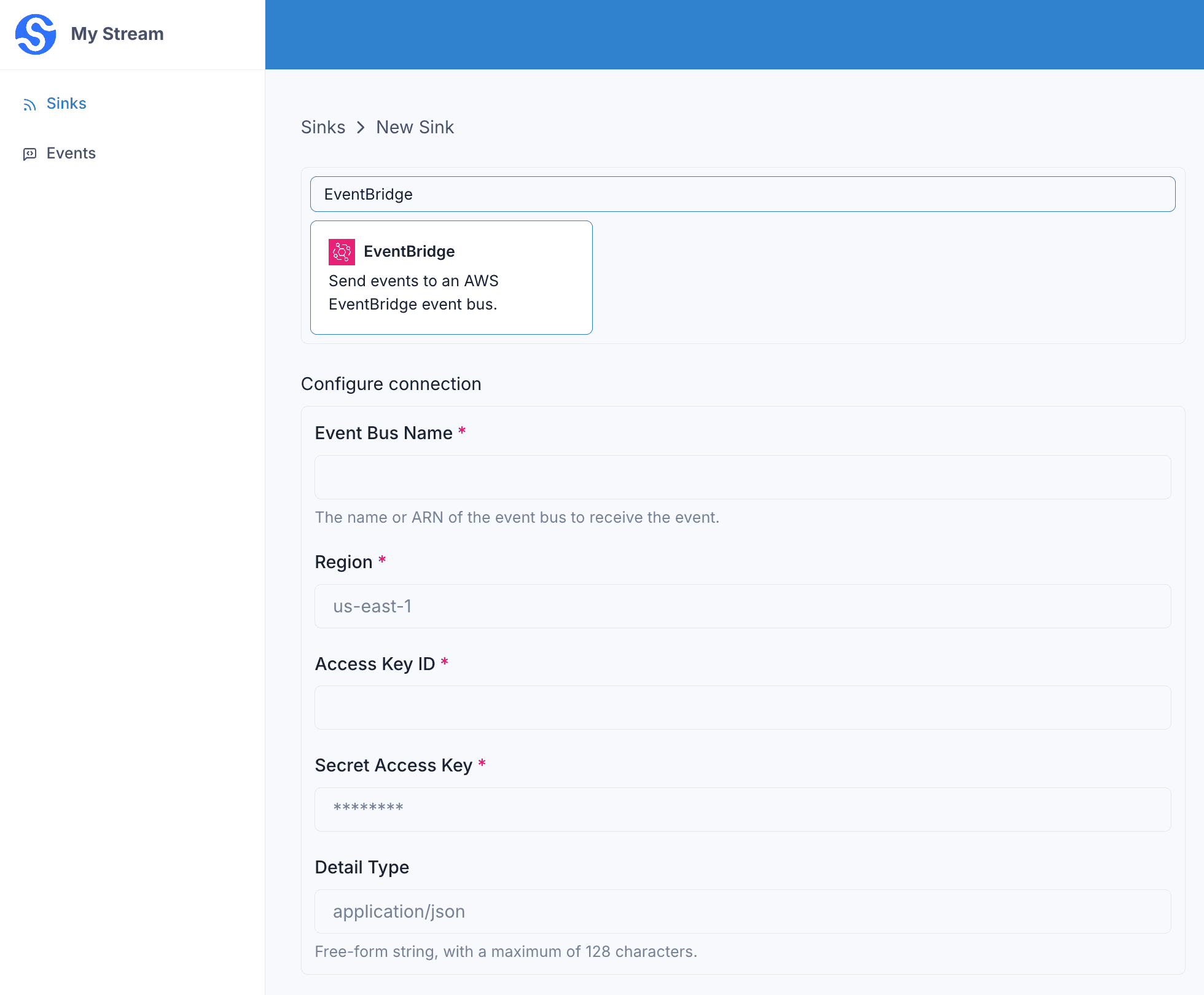
… or in the API .
curl -X 'POST' 'https://api.svix.com/api/v1/stream/strm_30XKA2tCdjHue2qLkTgc0/sink' \
  -H 'Authorization: Bearer AUTH_TOKEN' \
  -H 'Content-Type: application/json' \
  -d '{
  "type": "eventBridge",
  "config": {
    "eventBusName": "my-event-bus",
    "detailType": "application/json",
    "region": "us-east-1",
    "accessKeyId": "AKIA3LIKMTLDNWBX2PPD",
    "secretAccessKey": "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"
  },
  "uid": "unique-identifier",
  "status": "enabled",
  "batchSize": 1000,
  "maxWaitSecs": 300,
  "eventTypes": [],
  "metadata": {}
}'
Every event in the batch is sent to EventBridge as a separate entry.
eventBusName— the name or ARN of the event bus that receives the events.detailType— a free-form string (max 128 characters) used as thedetail-typeof each event. Defaults toapplication/json.region,accessKeyId,secretAccessKey— the AWS region and credentials used to authenticate.
Each event is published with its source set to svix-webhooks-<stream_id>, its detail-type set to the configured detailType, and its detail set to the message produced by the transformation. You can match on the source and detail-type when writing EventBridge rules.
Transformations
By default, all eventBridge Sinks come bundled with the following transformation code.
/**
 * @param input - The input object
 * @param input.events - The array of events in the batch. The number of events in the batch is capped by the Sink's batch size.
 * @param input.events[].payload - The message payload (string or JSON)
 * @param input.events[].eventType - The message event type (string)
 *
 * @returns Object containing the request body
 * @returns returns.payloads - The array of messages (strings) to send to the Sink. Each payload is a distinct message sent to the Sink.
 */
function handler(input) {

  const payloads = input.events.map((event) => JSON.stringify(event))

  return {
    payloads
  }
}
input.events matches the events sent in create_events.
Each entry in the returned payloads array becomes the detail of a separate EventBridge event. By default, each event is serialized to a JSON string containing its payload and eventType.
For example, if the following events are written to the stream:
curl -X 'POST' \
  'https://api.svix.com/api/v1/stream/{stream_id}/events' \
  -H 'Authorization: Bearer AUTH_TOKEN' \
  -H 'Accept: application/json' \
  -H 'Content-Type: application/json' \
  -d '{
        "events": [
            {
                "eventType": "user.created",
                "payload": "{\"email\": \"joe@enterprise.io\"}"
            },
            {
                "eventType": "user.login",
                "payload": "{\"id\": 12, \"timestamp\": \"2025-07-21T14:23:17.861Z\"}"
            }
        ]
    }'
The default transformation code would send two events to your event bus, with the following detail bodies.
{"payload":{"email":"joe@enterprise.io"},"eventType":"user.created"}{"payload":{"id":12,"timestamp":"2025-07-21T14:23:17.861Z"},"eventType":"user.login"}To control the detail of each event, return your own array of strings in payloads. Each string becomes the detail of one EventBridge event.
EventBridge accepts at most 10 entries per request, so larger batches are automatically split across multiple PutEvents calls.
Authentication
You can authenticate sinks to EventBridge using either a fixed AWS Access Key ID and Secret Access Key, or by using a role and cross-account delegated authentication. In either case, the target user/role must have the events:PutEvents permission on the relevant Event Bus.
Authenticating with Amazon IAM Roles and STS
Some sinks support authenticating using delegated authentication with Amazon Identity and Access Management (IAM) Roles. This can be more secure than using a fixed access key and secure token, because the remote session can only be used from a dedicated, Svix-operated AWS account via the AWS Security Token Service . In order to use role-based authentication:
-
Create your resource (S3 bucket, etc) as normal
-
In AWS IAM, create a new role and grant it the appropriate policy on the resource; take note of the ARN of the role, which should look like
arn:aws:iam::111111111111:role/some-name. -
Create a trust policy for your new role that looks like the following:
{
    "Version": "2012-10-17",
    "Statement": [
        {
            "Effect": "Allow",
            "Principal": {
                "AWS": "565881507882"
            },
            "Action": "sts:AssumeRole",
            "Condition": {
                "StringEquals": {
                    "sts:ExternalId": "source:<stream ID>:id:"
                }
            }
        }
    ]
}
Note that the account 565881507882 is a dedicated, Svix-managed account used for all outgoing STS relationships.
-
Create a new sink
curl -X 'POST' 'https://api.svix.com/api/v1/stream/strm_abcdef1234567890abcde/sink' \
  -H 'Authorization: Bearer AUTH_TOKEN' \
  -H 'Content-Type: application/json' \
  -d '{
  "type": "amazonS3",
  "config": {
    "bucket": "my-s3-bucket-name",
    "region": "us-west-2",
    "roleArn": "<ARN of the role from step 2>
  },
  "uid": "unique-identifier",
  "status": "enabled",
  "batchSize": 1000,
  "maxWaitSecs": 300,
  "eventTypes": [],
  "metadata": {}
}'
External IDs
By default, Svix sets the sts:ExternalId property to source:<stream ID>:id:; in the example above, it would be the string source:strm_abcdef1234567890abcde:id:. If you have multiple streams that you would like to allow to write to the same bucket, you can
provide an externalId value of your own choosing as a property to the v1.streaming.sink.create call. This can be any string that does not contain the : character. The sts:ExternalId property
will then be set to source:<stream ID>:id:<your provided value>. You can then write your Trust Relationship as the following:
{
    "Version": "2012-10-17",
    "Statement": [
        {
            "Effect": "Allow",
            "Principal": {
                "AWS": "565881507882"
            },
            "Action": "sts:AssumeRole",
            "Condition": {
                "StringLike": {
                    "sts:ExternalId": "source:*:id:<your selected value>"
                }
            }
        }
    ]
}
Note that in this case, the External Id does serve as a secret, and an attacker with access to it could cause their own stream to write into your bucket.
For more information about the sts:ExternalID property, please see the AWS documentation Access to AWS accounts owned by third parties .