Segment
Events can be sent to Segment using the segment sink type. Svix sends each batch of events to Segment’s HTTP Tracking API /v1/batch endpoint.
Like all Sinks, Segment sinks can be created in the Stream Portal…
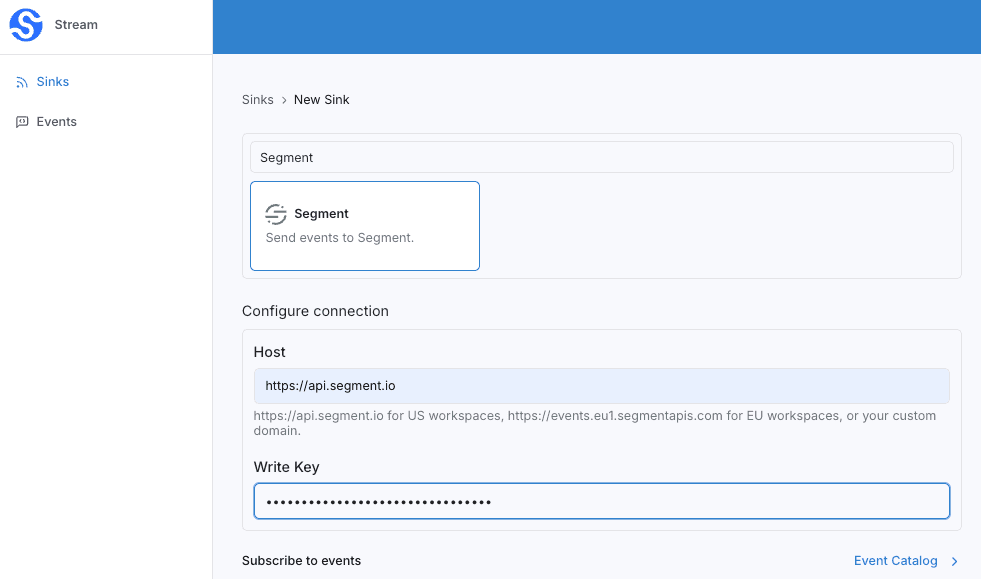
… or in the API .
curl -X 'POST' 'https://api.svix.com/api/v1/stream/strm_30XKA2tCdjHue2qLkTgc0/sink' \
  -H 'Authorization: Bearer AUTH_TOKEN' \
  -H 'Content-Type: application/json' \
  -d '{
  "type": "segment",
  "config": {
    "host": "https://api.segment.io",
    "writeKey": "*******"
  },
  "uid": "unique-identifier",
  "status": "enabled",
  "batchSize": 100,
  "maxWaitSecs": 10,
  "eventTypes": [],
  "metadata": {}
}'host— your Segment ingestion host. This ishttps://api.segment.iofor US workspaces,https://events.eu1.segmentapis.comfor EU workspaces, or your own custom domain.writeKey— your Segment source write key. Svix sends it using HTTP Basic auth, with the write key as the username and an empty password.
Segment sinks require a transformation. The transformation is what builds the Segment batch, and each entry in the batch must be a valid Segment call — one of identify, group, track, page, or screen.
Transformations
By default, all segment Sinks come bundled with the following transformation code.
/**
 * @param input - The input object
 * @param input.events - The array of events in the batch. The number of events in the batch is capped by the Sink's batch size.
 * @param input.events[].payload - The event payload (string or JSON).
 * @param input.events[].eventType - The event type (string).
 * @param input.events[].createdAt - The ISO 8601 timestamp the event was ingested at (string).
 *
 * @returns Object containing the batch of events sent to Segment's /v1/batch endpoint.
 * @returns returns.context - An optional dictionary of extra information, applied to every event in the batch.
 *                            For acceptable context fields, see
 *                            https://segment.com/docs/connections/spec/common#context
 * @returns returns.batch - An array of events sent in the batch. Each event must be one of
 *                          "identify", "group", "track", "page", or "screen", and is sent verbatim
 *                          to Segment's /v1/batch endpoint. See
 *                          https://segment.com/docs/connections/sources/catalog/libraries/server/http-api#batch
 */
function handler(input) {
  // An optional dictionary of extra information, applied to every event in the batch.
  const context = {};

  const batch = input.events.map((event) => ({
    // One of "identify", "group", "track", "page", or "screen".
    type: "track",
    event: event.eventType,
    timestamp: event.createdAt,
    ...event.payload,
  }));

  return { context, batch };
}
input.events matches the events sent in create_events.
The transformation builds a Segment batch. Each entry is one of Segment’s call types (the default is a track call) and is forwarded to Segment verbatim, so you have full control over the fields on each call. The optional context object is applied to every event in the batch.
For example, if the following events are written to the stream:
curl -X 'POST' \
  'https://api.svix.com/api/v1/stream/{stream_id}/events' \
  -H 'Authorization: Bearer AUTH_TOKEN' \
  -H 'Accept: application/json' \
  -H 'Content-Type: application/json' \
  -d '{
        "events": [
            {
                "eventType": "order.completed",
                "payload": "{\"userId\": \"usr_123\", \"total\": 42.0}"
            },
            {
                "eventType": "order.completed",
                "payload": "{\"userId\": \"usr_456\", \"total\": 9.99}"
            }
        ]
    }'
The default transformation would result in the following request being made to Segment’s /v1/batch endpoint :
{
  "batch": [
    {
      "type": "track",
      "event": "order.completed",
      "timestamp": "2025-11-03T14:20:16.466Z",
      "userId": "usr_123",
      "total": 42.0
    },
    {
      "type": "track",
      "event": "order.completed",
      "timestamp": "2025-11-03T14:20:16.526Z",
      "userId": "usr_456",
      "total": 9.99
    }
  ]
}
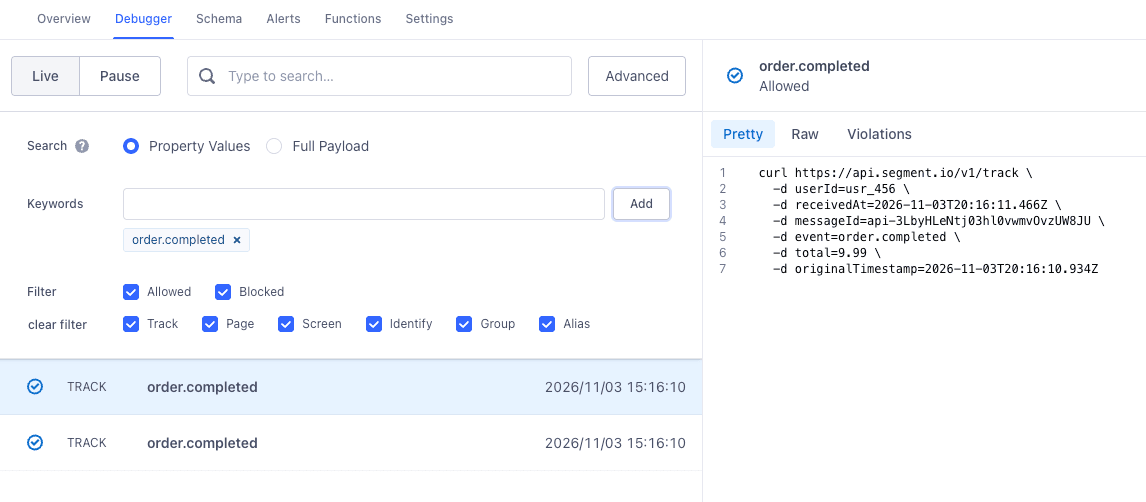
These events would subsequently be visible in your Project’s dashboard.