PostHog
Svix can deliver webhooks directly to PostHog , without your customers having to set up any listener endpoint or write any glue code. Each batch of webhooks is sent to PostHog’s /batch/ capture endpoint.
When Advanced Destinations are enabled, your customers will see the option to use a PostHog destination in the App Portal.
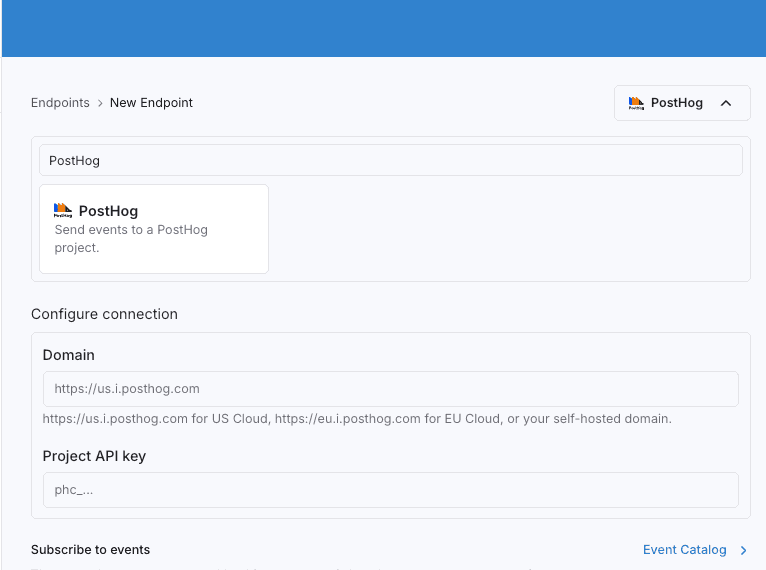
They will be able to configure the connection right in the App Portal:
domain— the PostHog ingestion domain. This ishttps://us.i.posthog.comfor US Cloud,https://eu.i.posthog.comfor EU Cloud, or a self-hosted domain. Note the.i.in the Cloud hosts —us.posthog.comandeu.posthog.comare different, private endpoints and won’t work here.projectToken— the PostHog project API key. Svix sends it as theapi_keyfield in the body of each request.
PostHog destinations require a transformation. The transformation is what builds the PostHog event batch, and in particular it’s where you set each event’s distinctId. PostHog uses distinctId to attribute events to a person and rejects events that don’t have one, so it can’t be left unset.
If every webhook in a batch is timestamped more than 48 hours in the past, Svix sends the batch with PostHog’s historical_migration flag set. This keeps backfills (for example, after a destination has been disabled and re-enabled) from tripping PostHog’s spike detection . Nothing needs to be configured for this to happen.
Transformations
Each webhook is mapped to a PostHog event . A transformation returns the batch of events to send.
/**
 * @param input - The input object
 * @param input.events - The array of webhooks in the batch. The number of webhooks in the batch is capped by the destination's batch size.
 * @param input.events[].payload - The message payload (string or JSON).
 * @param input.events[].eventType - The message event type (string).
 * @param input.events[].createdAt - The ISO 8601 timestamp the webhook was received at (string).
 *
 * @returns Object containing the batch of events sent to PostHog's /batch/ endpoint.
 * @returns returns.batch - An array of PostHog events (https://posthog.com/docs/data/events).
 * @returns returns.batch[].event - The name of the event sent to PostHog.
 * @returns returns.batch[].distinctId - REQUIRED. The unique identifier of the person the event
 *                                       belongs to. It cannot be inferred from the event, so you
 *                                       must set it, usually from a field in the payload. PostHog
 *                                       rejects events that have no distinctId.
 * @returns returns.batch[].timestamp - An optional ISO 8601 timestamp for the event. If omitted, PostHog uses the time it receives the event.
 * @returns returns.batch[].properties - A map of properties associated with the event (https://posthog.com/docs/data/events#event-properties).
 */
function handler(input) {
  const batch = input.events.map((event) => ({
    event: event.eventType,
    // REQUIRED. PostHog uses distinctId to attribute events to a person and rejects events that
    // have none. Replace this with a value from your payload.
    distinctId: undefined,
    timestamp: event.createdAt,
    properties: event.payload,
  }));

  return { batch };
}
input.events is the list of webhooks received by the destination, processed in batches.
The transformation maps each webhook onto a PostHog event . Most of the fields map over cleanly — event from the event type, timestamp from when the webhook was received, and properties from the payload. The one field you have to supply yourself is distinctId, since it’s specific to how you identify people in PostHog.
For example, if the destination receives the following messages:
{
  "eventType": "user.signed_up",
  "payload": "{\"userId\": \"usr_123\", \"plan\": \"pro\"}"
}
{
"eventType": "user.signed_up",
"payload": "{\"userId\": \"usr_456\", \"plan\": \"free\"}"
}A transformation that sets distinctId from the payload’s userId:
function handler(input) {
  const batch = input.events.map((event) => ({
    event: event.eventType,
    distinctId: event.payload.userId,
    timestamp: event.createdAt,
    properties: event.payload,
  }));

  return { batch };
}
would result in the following request being made to PostHog’s /batch/ endpoint:
{
  "api_key": "phc_*******",
  "batch": [
    {
      "event": "user.signed_up",
      "distinct_id": "usr_123",
      "timestamp": "2025-07-21T14:23:17.861Z",
      "properties": { "userId": "usr_123", "plan": "pro" }
    },
    {
      "event": "user.signed_up",
      "distinct_id": "usr_456",
      "timestamp": "2025-07-21T14:23:19.204Z",
      "properties": { "userId": "usr_456", "plan": "free" }
    }
  ]
}
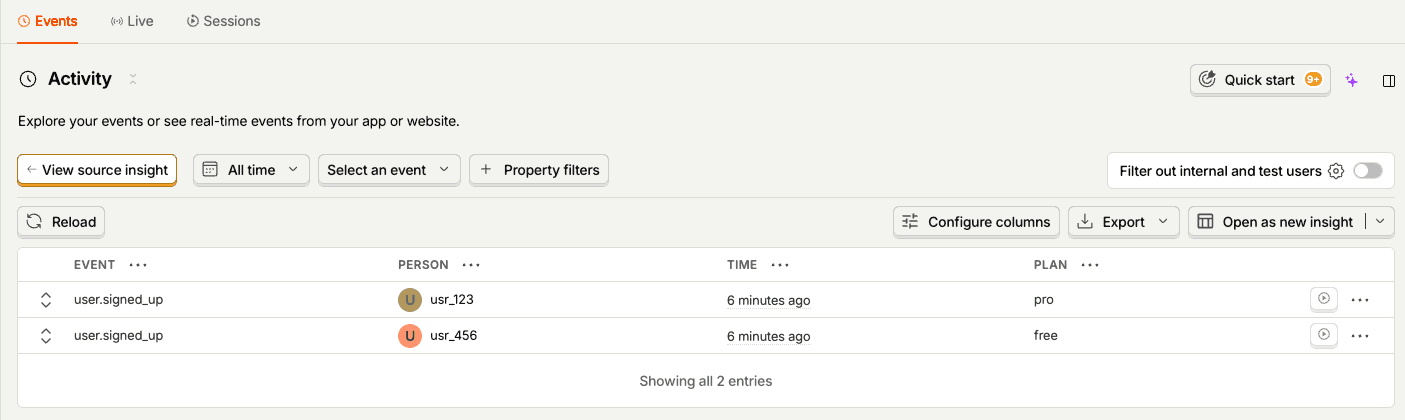
These events would subsequently be visible in your PostHog dashboard.